Three places to run the model. You choose.
Useful AI, without your data leaving.
The question is not whether your mail talks to an AI. It is where the model runs, and where your messages end up. At OxiMail the answer fits in one sentence: the model runs where you decide, and your data does not leave your infrastructure. Two building blocks make this possible, plus a guarantee that matters most to those bound by confidentiality.
The principle
The sovereignty of an AI is not about the protocol. It is about where the model runs.
People often confuse "plugging in an AI" with "sending your data to a US provider". These are two different things. What matters is where the computation happens. OxiMail offers three ways to run the model, and none of them sends your messages to a US cloud by default.
On your appliance
The model runs on the GPU of your own OxiMail server, at the office or the practice. Nothing leaves. This is the option chosen when confidentiality comes first, for example with health data.
On your device
A lightweight model runs on the user’s own machine, offline. Useful for individual use, with no dedicated server.
In a Swiss or European cloud
When you want a large model without buying a GPU, the computation goes to a Swiss or European provider you choose, under contract, in your jurisdiction. Never a US cloud by default.
Two building blocks
AI inside OxiMail, or OxiMail inside your AI.
Depending on whether the agent runs on your server or in another tool you use, two products answer the need. They are complementary and never interchangeable.
The built-in assistant
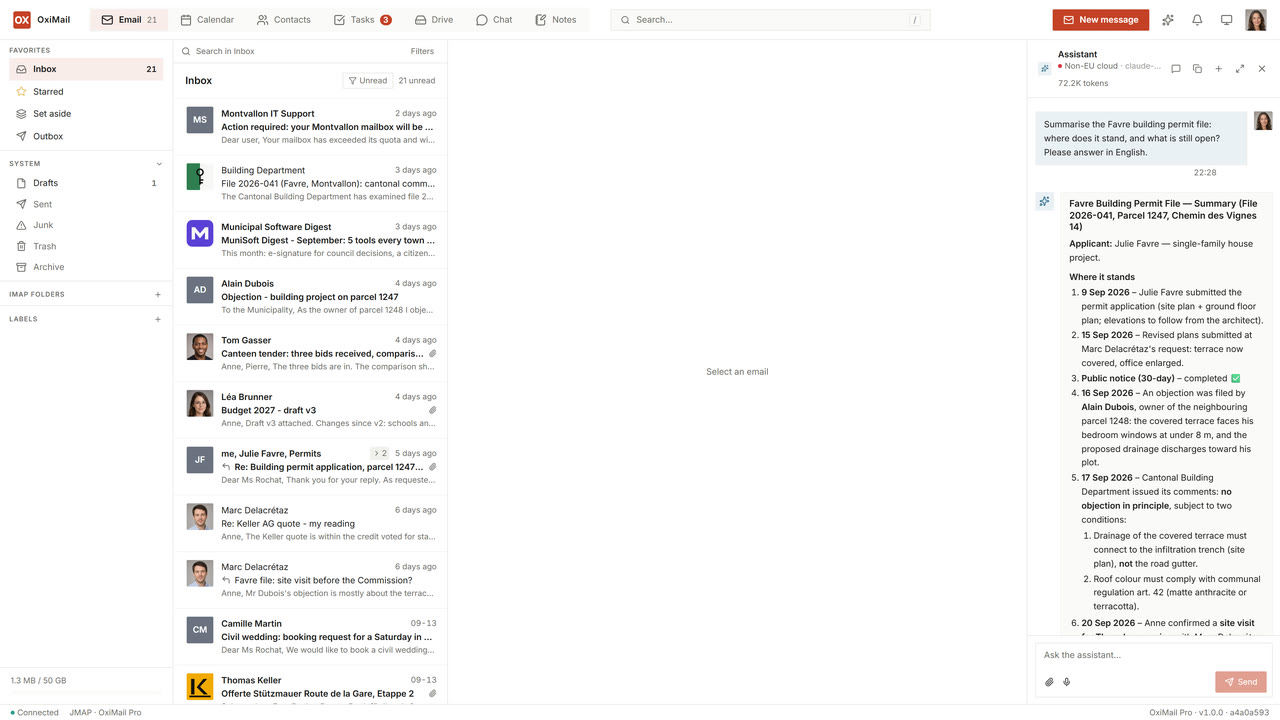
AI inside OxiMail. You talk to it from the webmail or the app, and it acts across your mail, calendar, contacts, files, notes, chat rooms, calls and out-of-office: it summarises, searches, sorts and drafts replies. It translates a message that arrives in a language you do not read, transcribes what you dictate — a note, a mail, a voice message — on the same hardware, and reads the documents you hand it. It searches the whole body of a message rather than a preview of it, and it reaches the mailboxes and team folders that are shared with you — not only your own. The reasoning loop and the tools run on the server, under your control, and answers stream back word by word instead of arriving after a silence. The assistant can never step outside your account or into someone else’s: isolation is enforced by the server, not by the model. Anything it would change — sending, deleting, moving — is proposed and waits for your confirmation. Your conversation history stays on your server, with what each exchange cost in tokens next to it.
The MCP connector (OxiMail MCP)
OxiMail exposed to the AI you already use. MCP is an open standard: it lets an assistant such as Claude, ChatGPT, Cursor or GitHub Copilot read and act in your OxiMail mailbox, with your consent and your permissions. Installation is a file you drag into the application, then each person signs in with their own OxiMail account through a form we serve — there is no shared master token, and each user sees exactly what their account allows. Here the agent runs at your AI provider, so sovereignty depends on the client you plug in. It is the mirror image of the built-in assistant.
The medical practice case
An assistant on the doctor’s phone, with nothing going to a US cloud.
Take a concrete case. A doctor wants to manage their mail from their phone, with an assistant’s help, without any patient data passing through a US service. Medical confidentiality and Swiss data-protection law require it. A consumer ChatGPT or a free webmail cannot guarantee this: their models run on servers that are not yours.
The OxiMail answer: the appliance installed at the practice, fitted with a GPU, runs the model locally. The phone is only a thin client. It asks the question, the appliance does all the work on site, the phone shows the answer. The prompt, the content of the messages and the answer all stay at the practice.
- "Summarise this morning’s unread patient messages."
- "Find my last exchange with Mrs Rossier and her next appointment."
- "Draft a polite reply to move Thursday’s consultation."
- "File today’s lab results into the right record."
Neither those sentences nor the content they touch leave the practice. That is the promise: an assistant on a par with what you find in the cloud, with no patient data leaving your walls.
What stays with you
The guarantee is technical, not just contractual.
The model runs on site
On the appliance, the computation happens on your GPU. There is no outbound call to a third party to produce the answer.
The server enforces permissions
The assistant acts through the same access controls as your users. It cannot read another patient’s, practitioner’s or client’s account. The model cannot bypass that boundary.
Conversations stay on your server
The history of your exchanges with the assistant is stored on your own OxiMail, on the disk you control, under the same protection as the rest of your data — and it goes when the account goes.
The model is chosen on measurements
We run the assistant against a fixed set of scenarios on a frozen mailbox, and compare models on the results rather than on their reputation. That is how we tell you a small local model is enough for your use, or that it is not — and it is how a change to the assistant is caught before it reaches you. Usage quotas are yours to set, so a runaway conversation cannot quietly spend a budget.
Want an assistant that stays with you?
Tell us your context: your profession, the number of accounts, your confidentiality obligations. We point you at the right setup, from an isolated device to an appliance with a GPU.