Workspace
One web client for the whole suite.
Available
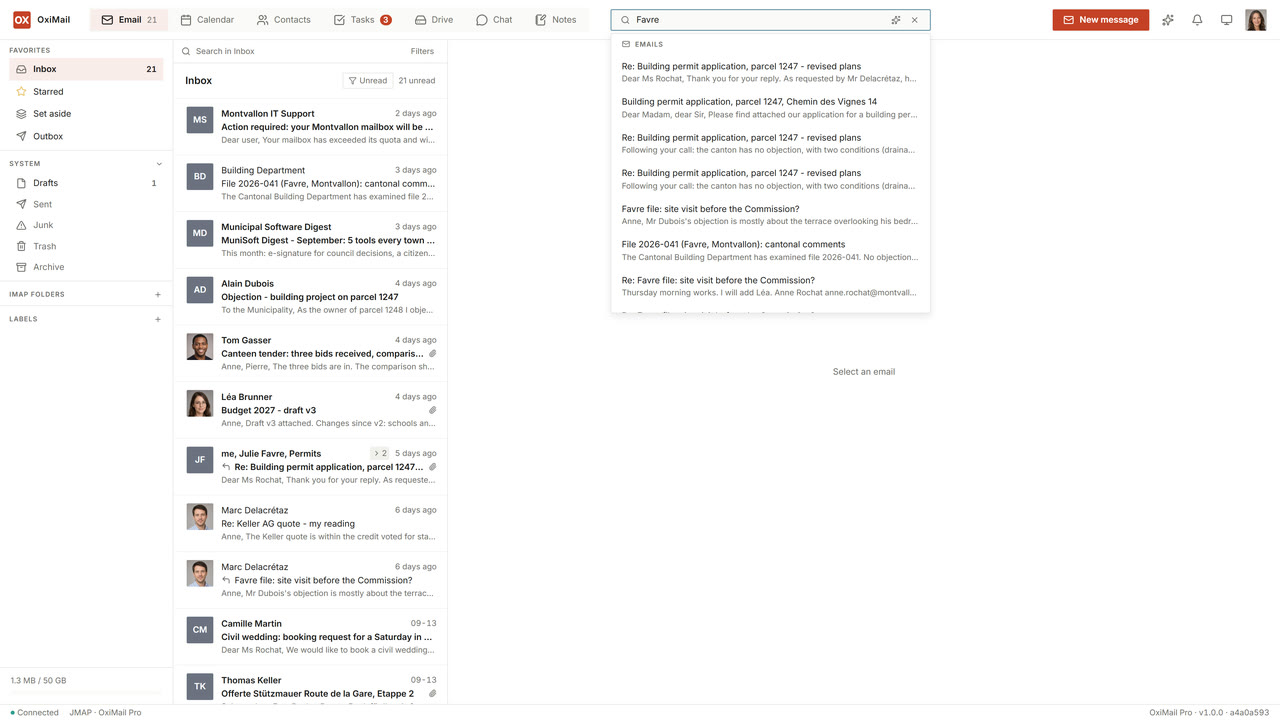
Workspace is the browser client that puts the entire OxiMail surface in front of your users: mail, calendar, contacts, tasks, files, notes and chat — one interface, one sign-in, one consistent state. It is the webmail people actually want to open, not a fallback they tolerate.
What’s inside
Eight surfaces, one application.
- MailThreaded conversations, keyboard-driven, fast search inside a folder or across the account. Server-side Sieve rules surface as editable filters. Newsletters unsubscribe in one click through the standard header, and junking one offers to unsubscribe rather than just hiding it. Bulk selection acts on the whole batch, and remote images are fetched by the server, never by your browser. With the AI module, a message in a foreign language offers its translation in place, and the body of a reply can be dictated.
- CalendarMultiple calendars, ICS interoperability with Outlook, Google and Apple, shared availability. Invitations arrive as cards you answer in place — including the cancellations and replies other servers send.
- ContactsvCard import and export, sharing by person or by group, a company-wide directory with per-tenant visibility controls.
- TasksList and kanban views, due dates and assignments — the project surface most webmails never have.
- FilesA collaborative drive with folder permissions, revocable share links and version history — the same tree Drive mounts on the office network.
- NotesNotebooks, pages and labels for what is not a task: a call summary, an idea, the points from a meeting. A page carries headings, lists, checkboxes and images, links to a mail, a contact, an appointment or a file, and is found by full-text search. Notebooks are shared like calendars. With the AI module, a page can be dictated and transcribed on your own server.
- ChatRooms and one-to-one conversations, polls, read receipts, formatting and scheduled sending. Voice messages, transcribed on request by the recipient. Drafts are held by the server, so an unfinished message follows you from your desktop to your phone.
- Video callsUp to three participants, with screen sharing, an incoming-call ring, a waiting room and a movable window. A meeting is scheduled from the calendar and its link travels in the invitation; someone without an account joins by that link, and anyone in a call can pull in one more person. Larger meetings wait on the media relay, and we say so rather than letting you find out in the meeting.
Why it works
Co-designed, not assembled.
Workspace uses JMAP capabilities that reach beyond the mail RFC — tasks, files, chat. A generic JMAP backend gives you mail and maybe calendar; it cannot expose what Workspace needs for the rest of the suite. Client and server are versioned together and their protocol boundaries move in lockstep.
This is the opposite of the “mail backend + a separate file app + a separate chat app + a VoIP stack” assemblies. The integrated state, the single authentication, the cross-surface search and the consistent UX are a consequence of the co-design — and because it is all JMAP, the standard stays open underneath.
Sign-in
Passkeys first, phishing-resistant.
Workspace signs users in with passkeys — no shared password to phish, no SMS code to intercept — and the settings screen lists the passkeys registered on an account so a user can revoke a lost laptop themselves. Application passwords for IMAP or SMB clients are created and revoked from the same screen. Settings, signature, notification preferences and the Sieve rule editor all live in the same interface, so an administrator and an end user manage the same account through one consistent surface.
See Workspace in your context.
Tell us about your environment and we will arrange a commercial evaluation against your real mail clients and your real accounts.